Making relationships visible across systems
Making relationships visible across systems
Sensitive information notice
Some details in this case study have been intentionally blurred or modified to protect confidential data, while preserving the overall context and design decisions.
Role
Product Designer
Role
Product Designer
Year
2025
Year
2025
Category
WEb,Saas
Category
WEb,Saas
The context
The context
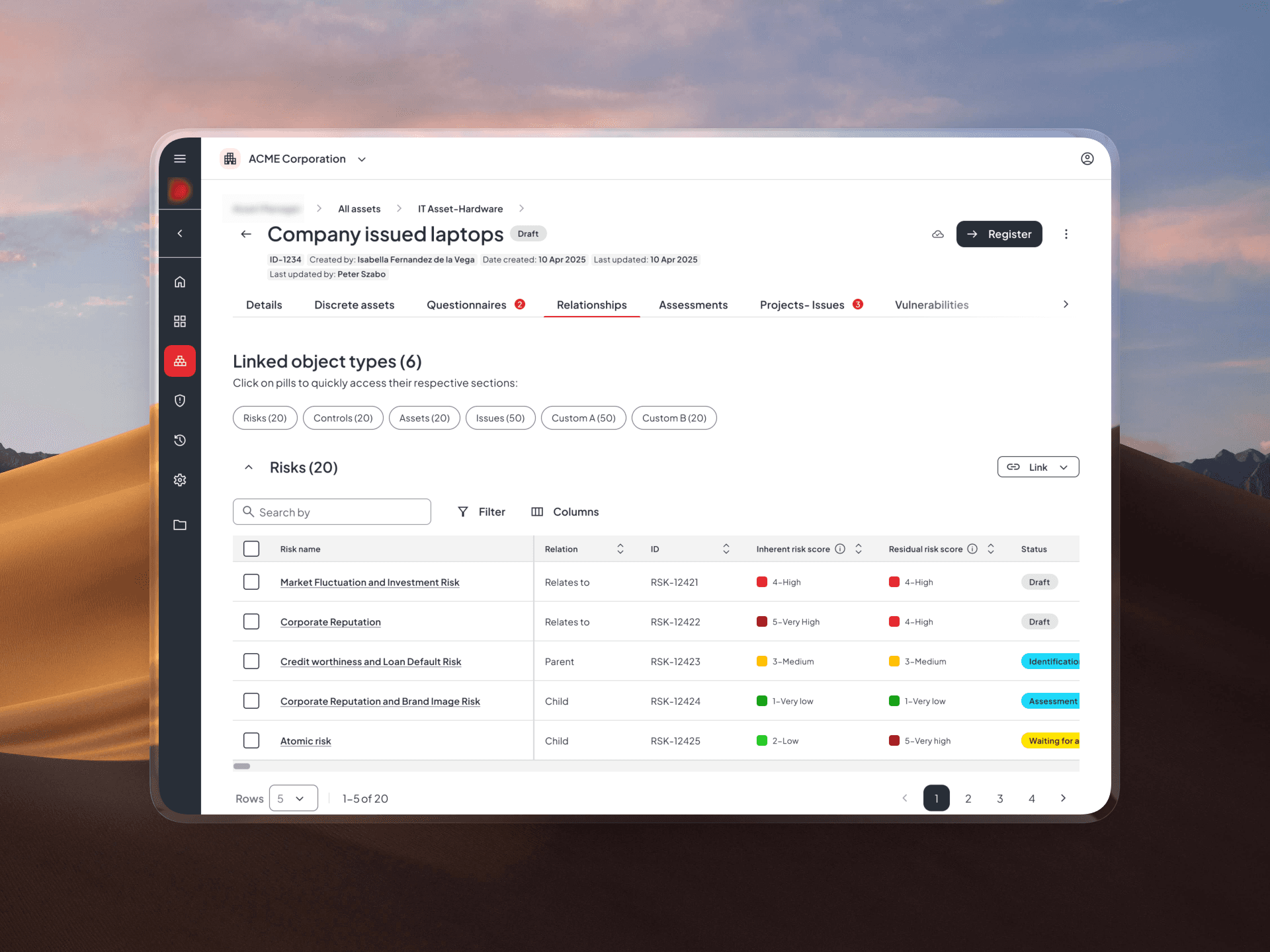
Relationships are a core part of enterprise workflows, allowing users to connect different types of governance data such as risks, controls, processes, issues, and assets.
This functionality appears across multiple products, typically within a single object views, helping users understand how different entities are connected and how they impact each other.
Relationships are a core part of enterprise workflows, allowing users to connect different types of governance data such as risks, controls, processes, issues, and assets.
This functionality appears across multiple products, typically within a single object views, helping users understand how different entities are connected and how they impact each other.
The problem
As the system scaled, the existing relationships experience became increasingly difficult to use.
Users struggled to link objects, lacked visibility into relevant data, and found it hard to understand connections across different products. The feature worked for simpler setups, but broke down in more complex environments with large volumes of interconnected data and diverse organizational needs.
We got some messages, concerns about the existing feature:

David Miller
David Miller
“When linking objects, I only see the name and ID — I don’t have enough context to know if I’m selecting the right one
“When linking objects, I only see the name and ID — I don’t have enough context to know if I’m selecting the right one

Laura Carlson
With large datasets, the card view just doesn’t work — I have to scroll a lot, and I still don’t see enough information.
Laura Carlson
With large datasets, the card view just doesn’t work — I have to scroll a lot, and I still don’t see enough information.
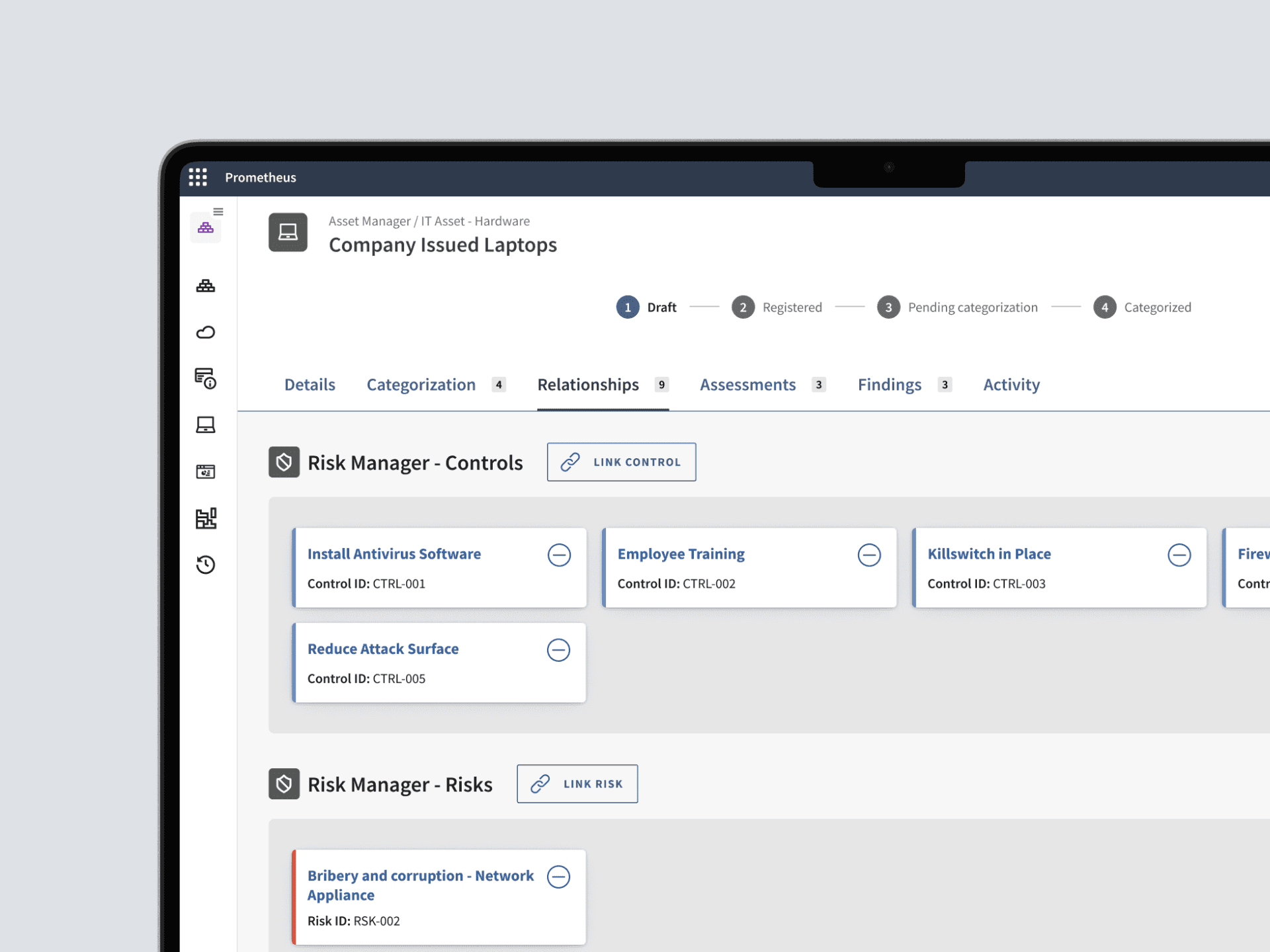
Existing relationships tab.
The opportunity
To address these challenges, the experience needed to evolve into a system that could support complexity without sacrificing usability.
1
Designed for scale
The solution needed to work equally well for simple use cases with a few objects and for complex scenarios involving hundreds of relationships.
3
Effortless linking
Linking needed to become more intuitive and informative, allowing users to confidently connect objects without navigating back and forth or relying on limited information.
2
Context at a glance
Users needed more than just names and IDs — the experience had to surface key attributes upfront to enable faster understanding and decision-making.
4
Consistent across products
Since the Relationships tab is used across several applications, the solution needed to function as a scalable, reusable pattern that ensures consistency while supporting different use cases.
1
Designed for scale
The solution needed to work equally well for simple use cases with a few objects and for complex scenarios involving hundreds of relationships.
2
Context at a glance
Users needed more than just names and IDs — the experience had to surface key attributes upfront to enable faster understanding and decision-making.
3
Effortless linking
Linking needed to become more intuitive and informative, allowing users to confidently connect objects without navigating back and forth or relying on limited information.
4
Consistent across products
Since the Relationships tab is used across several applications, the solution needed to function as a scalable, reusable pattern that ensures consistency while supporting different use cases.
My responsibilities
I led the design end-to-end, from discovery to delivery.
Synthesized customer feedback and pain points
Explored solution spaces through structured ideation
Designed and tested scalable interaction patterns
Delivered high-fidelity prototypes and supported development
How I started
Understanding the landscape
To kick off the project, I focused on understanding the broader ecosystem this feature lives in.
This wasn’t a standalone experience, it spanned across multiple products, teams, and user groups. Before jumping into solutions, I needed clarity on three key aspects:
How many applications are involved?
Which teams own or influence these areas?
What are the different stakeholder needs across these touchpoints?

What I learned
To better understand how relationships are used in practice, I conducted user interviews alongside mapping the broader ecosystem.
01
The current experience doesn’t scale
Card-based layouts quickly become difficult to navigate as the number of relationships grows, leading to clutter and loss of overview.
01
The current experience doesn’t scale
Card-based layouts quickly become difficult to navigate as the number of relationships grows, leading to clutter and loss of overview.
2026
02
Relationships need context, not just links
Users need to see key attributes to understand what they are looking at — names and IDs are not enough.
02
Relationships need context, not just links
Users need to see key attributes to understand what they are looking at — names and IDs are not enough.
2025
03
Comparison is a core part of the workflow
Users actively compare related entities to make decisions, which the current experience does not support well.
03
Comparison is a core part of the workflow
Users actively compare related entities to make decisions, which the current experience does not support well.
2024
04
Consistency across contexts is critical
Although used across different areas, the experience needs to feel unified and predictable.
04
Consistency across contexts is critical
Although used across different areas, the experience needs to feel unified and predictable.
2023
These findings made it clear that the problem wasn’t just about improving a single screen, it required rethinking how relationships are structured and interacted with at a broader level.
What I learned
To better understand how relationships are used in practice, I conducted user interviews alongside mapping the broader ecosystem.
01
The current experience doesn’t scale
Card-based layouts quickly become difficult to navigate as the number of relationships grows, leading to clutter and loss of overview.
01
The current experience doesn’t scale
Card-based layouts quickly become difficult to navigate as the number of relationships grows, leading to clutter and loss of overview.
2026
02
Relationships need context, not just links
Users need to see key attributes to understand what they are looking at — names and IDs are not enough.
02
Relationships need context, not just links
Users need to see key attributes to understand what they are looking at — names and IDs are not enough.
2025
03
Comparison is a core part of the workflow
Users actively compare related entities to make decisions, which the current experience does not support well.
03
Comparison is a core part of the workflow
Users actively compare related entities to make decisions, which the current experience does not support well.
2024
04
Consistency across contexts is critical
Although used across different areas, the experience needs to feel unified and predictable.
04
Consistency across contexts is critical
Although used across different areas, the experience needs to feel unified and predictable.
2023
These findings made it clear that the problem wasn’t just about improving a single screen, it required rethinking how relationships are structured and interacted with at a broader level.
What I learned
To better understand how relationships are used in practice, I conducted user interviews alongside mapping the broader ecosystem.
01
The current experience doesn’t scale
Card-based layouts quickly become difficult to navigate as the number of relationships grows, leading to clutter and loss of overview.
02
Relationships need context, not just links
Users need to see key attributes to understand what they are looking at — names and IDs are not enough.
03
Comparison is a core part of the workflow
Users actively compare related entities to make decisions, which the current experience does not support well.
04
Consistency across contexts is critical
Although used across different areas, the experience needs to feel unified and predictable.
These findings made it clear that the problem wasn’t just about improving a single screen, it required rethinking how relationships are structured and interacted with at a broader level.
Exploration
Exploring solutions across different scenarios
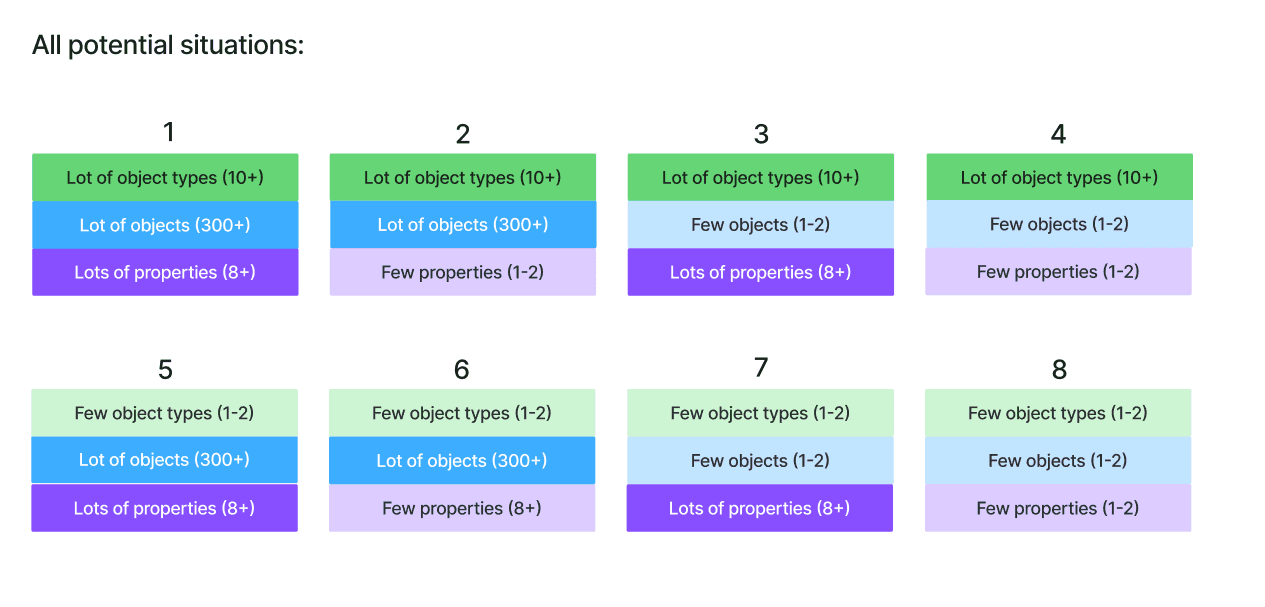
With a clearer understanding of the problem, I started mapping out different solution directions. The goal wasn’t to find a single ideal layout, but to understand how each approach performs under different conditions.
Instead of designing for an average case, I focused on edge scenarios — where the current experience was already breaking down.
Few entity types with a small number of relationships
Many entity types with a small number of relationships
Few entity types with a large number of relationships
Many entity types with a large number of relationships
Exploration
Exploring solutions across different scenarios
With a clearer understanding of the problem, I started mapping out different solution directions. The goal wasn’t to find a single ideal layout, but to understand how each approach performs under different conditions.
Instead of designing for an average case, I focused on edge scenarios — where the current experience was already breaking down.
Few entity types with a small number of relationships
Few entity types with a large number of relationships
Many entity types with a small number of relationships
Many entity types with a large number of relationships
Exploration
Exploring solutions across different scenarios
With a clearer understanding of the problem, I started mapping out different solution directions.
The goal wasn’t to find a single ideal layout, but to understand how each approach performs under different conditions.
Instead of designing for an average case, I focused on edge scenarios — where the current experience was already breaking down.
Few entity types with a small number of relationships
Few entity types with a large number of relationships
Many entity types with a small number of relationships
Many entity types with a large number of relationships
Narrowing down
Aligning on the right direction
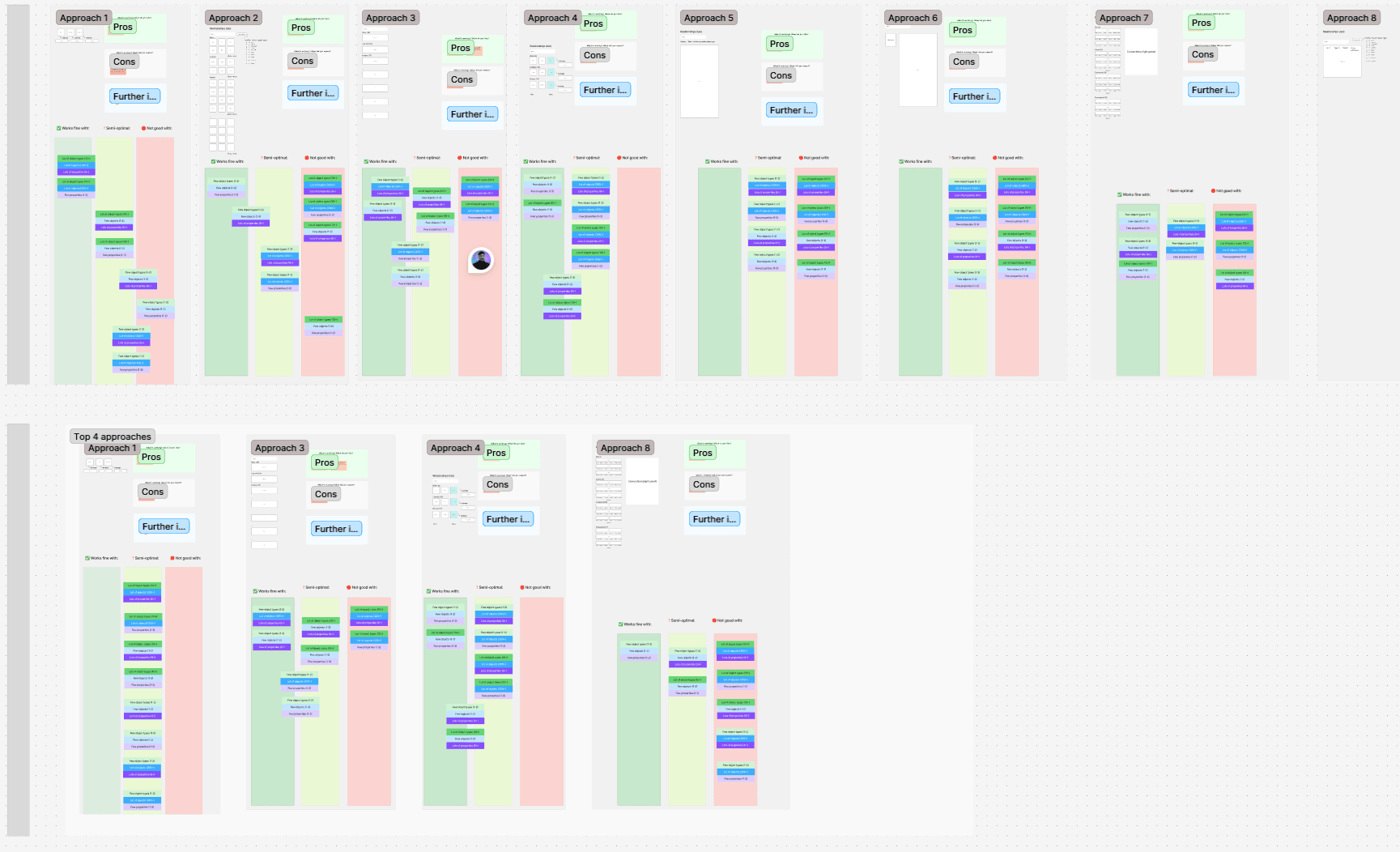
After mapping out the different directions, I shared the strongest concepts in a design review with the team.
Decision points
We evaluated each direction based on:
How it performs with large datasets
How well it supports different entity types
The complexity and feasibility of implementation
Outcome
Based on this, I narrowed the focus to the most viable directions and moved forward with high-fidelity designs. Working at this level made it easier to validate not just the structure, but also the interaction details.
Narrowing down
Aligning on the right direction
After mapping out the different directions, I shared the strongest concepts in a design review with the team.
Decision points
We evaluated each direction based on:
How it performs with large datasets
How well it supports different entity types
The complexity and feasibility of implementation
Outcome
Based on this, I narrowed the focus to the most viable directions and moved forward with high-fidelity designs. Working at this level made it easier to validate not just the structure, but also the interaction details.
Narrowing down
Aligning on the right direction
After mapping out the different directions, I shared the strongest concepts in a design review with the team.
Decision points
We evaluated each direction based on:
How it performs with large datasets
How well it supports different entity types
The complexity and feasibility of implementation
Outcome
Based on this, I narrowed the focus to the most viable directions and moved forward with high-fidelity designs. Working at this level made it easier to validate not just the structure, but also the interaction details.
Validation
Prototyping and testing the concepts
After narrowing down the directions during review, I selected two concepts to move forward with and created high-fidelity interactive prototypes.
These were chosen based on how well they handled the identified edge cases and their potential to scale across different scenarios.
What i tested
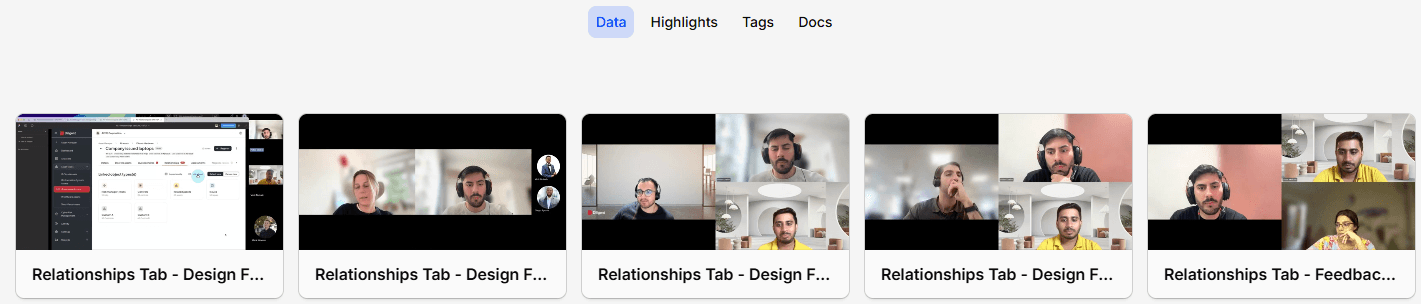
The sessions focused on comparing the two approaches in real usage scenarios
Which layout feels easier to navigate
Which one makes relationships more understandable at a glance
Which approach better supports their day-to-day workflow
How easily users can compare information across entities
Which linking flow feels more straightforward and reliable
Validation
Prototyping and testing the concepts
After narrowing down the directions during review, I selected two concepts to move forward with and created high-fidelity interactive prototypes.
These were chosen based on how well they handled the identified edge cases and their potential to scale across different scenarios.
What i tested
The sessions focused on comparing the two approaches in real usage scenarios
Which layout feels easier to navigate
How easily users can compare information across entities
Which one makes relationships more understandable at a glance
Which linking flow feels more straightforward and reliable
Which approach better supports their day-to-day workflow
Validation
Prototyping and testing the concepts
After narrowing down the directions during review, I selected two concepts to move forward with and created high-fidelity interactive prototypes.
These were chosen based on how well they handled the identified edge cases and their potential to scale across different scenarios.
What i tested
The sessions focused on comparing the two approaches in real usage scenarios
Which layout feels easier to navigate
How easily users can compare information across entities
Which one makes relationships more understandable at a glance
Which linking flow feels more straightforward and reliable
Which approach better supports their day-to-day workflow
Outcome
Selecting the final direction
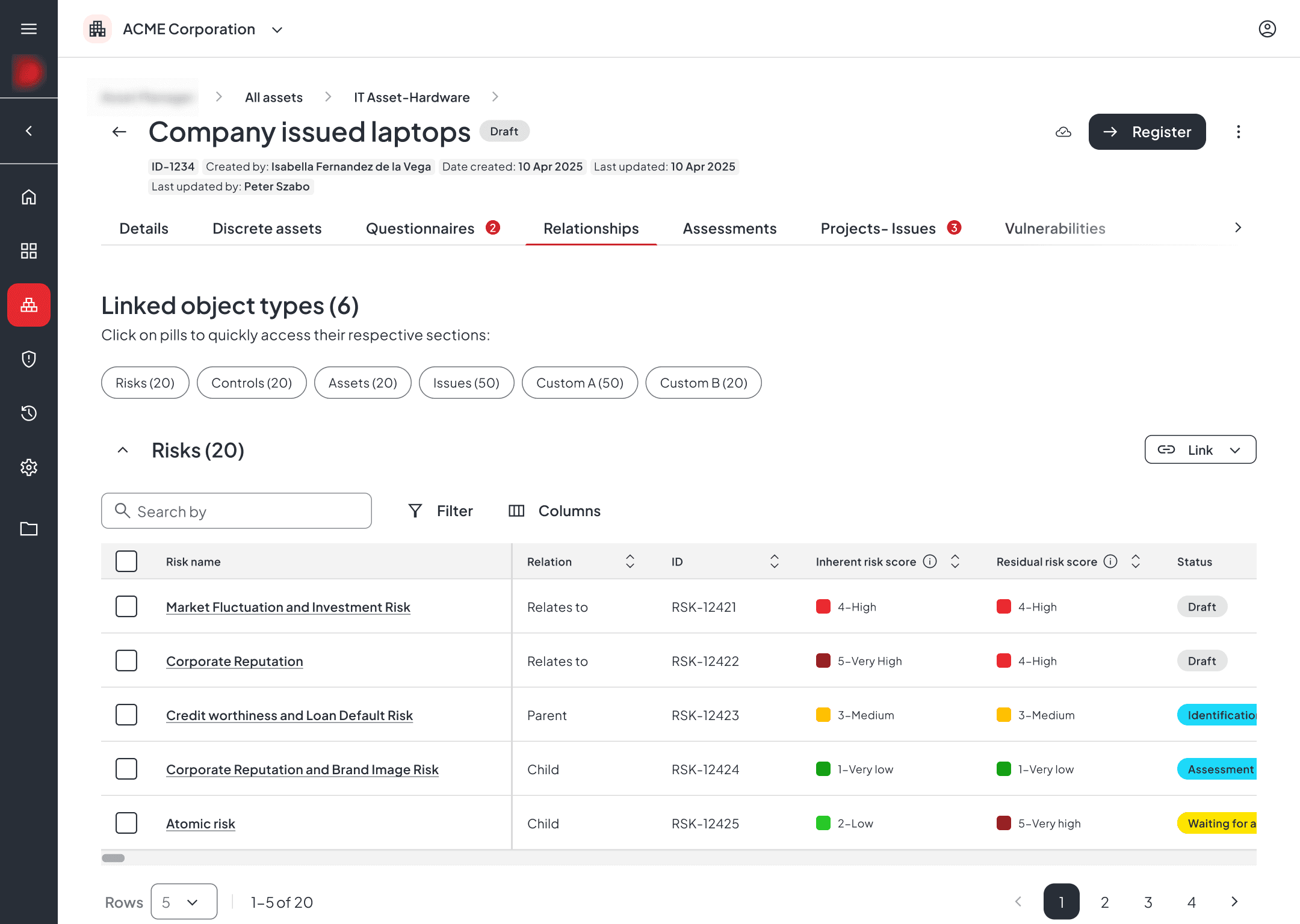
After synthesizing the testing results in Dovetail, clear patterns started to emerge across sessions. One of the approaches consistently performed better in key scenarios, especially when working with larger datasets and comparing multiple relationships.
Outcome
Selecting the final direction
After synthesizing the testing results in Dovetail, clear patterns started to emerge across sessions. One of the approaches consistently performed better in key scenarios, especially when working with larger datasets and comparing multiple relationships.
Outcome
Selecting the final direction
After synthesizing the testing results in Dovetail, clear patterns started to emerge across sessions. One of the approaches consistently performed better in key scenarios, especially when working with larger datasets and comparing multiple relationships.
Why this direction:
The selected approach gave users more control and visibility when working with relationships. Compared to the previous experience, it removed several key limitations.
New structure- expandable tables
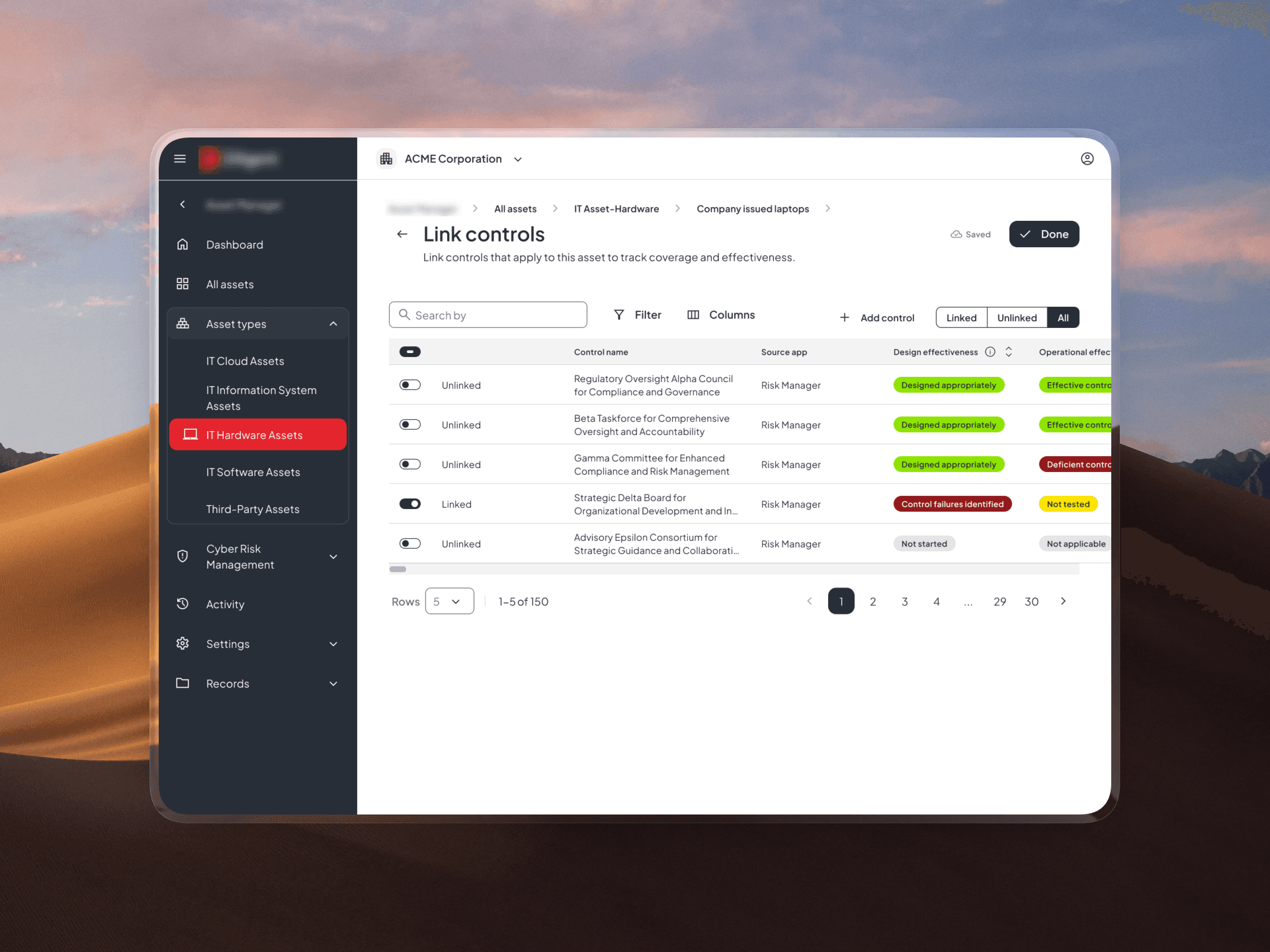
New linking method
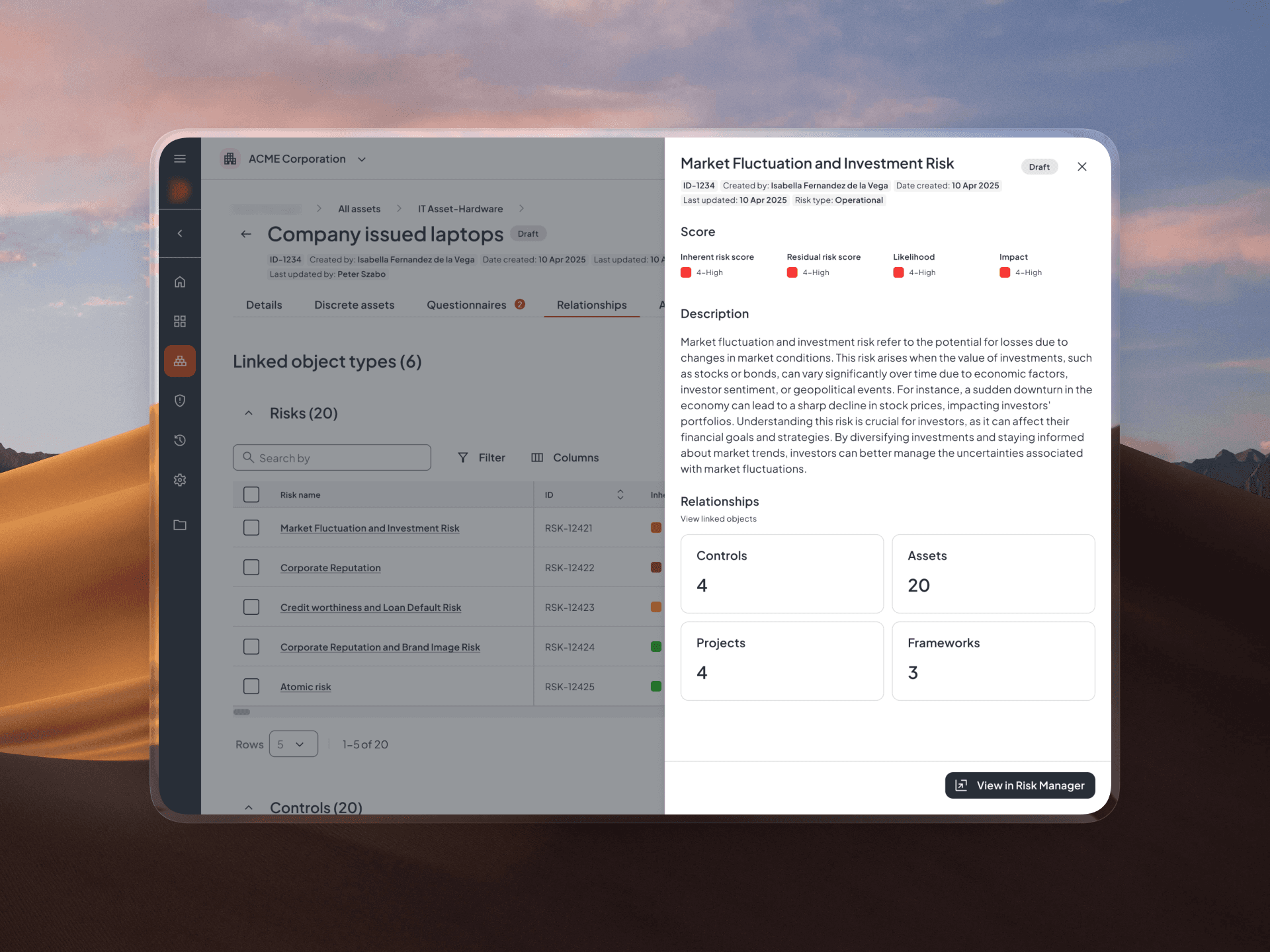
A new way to see related objects
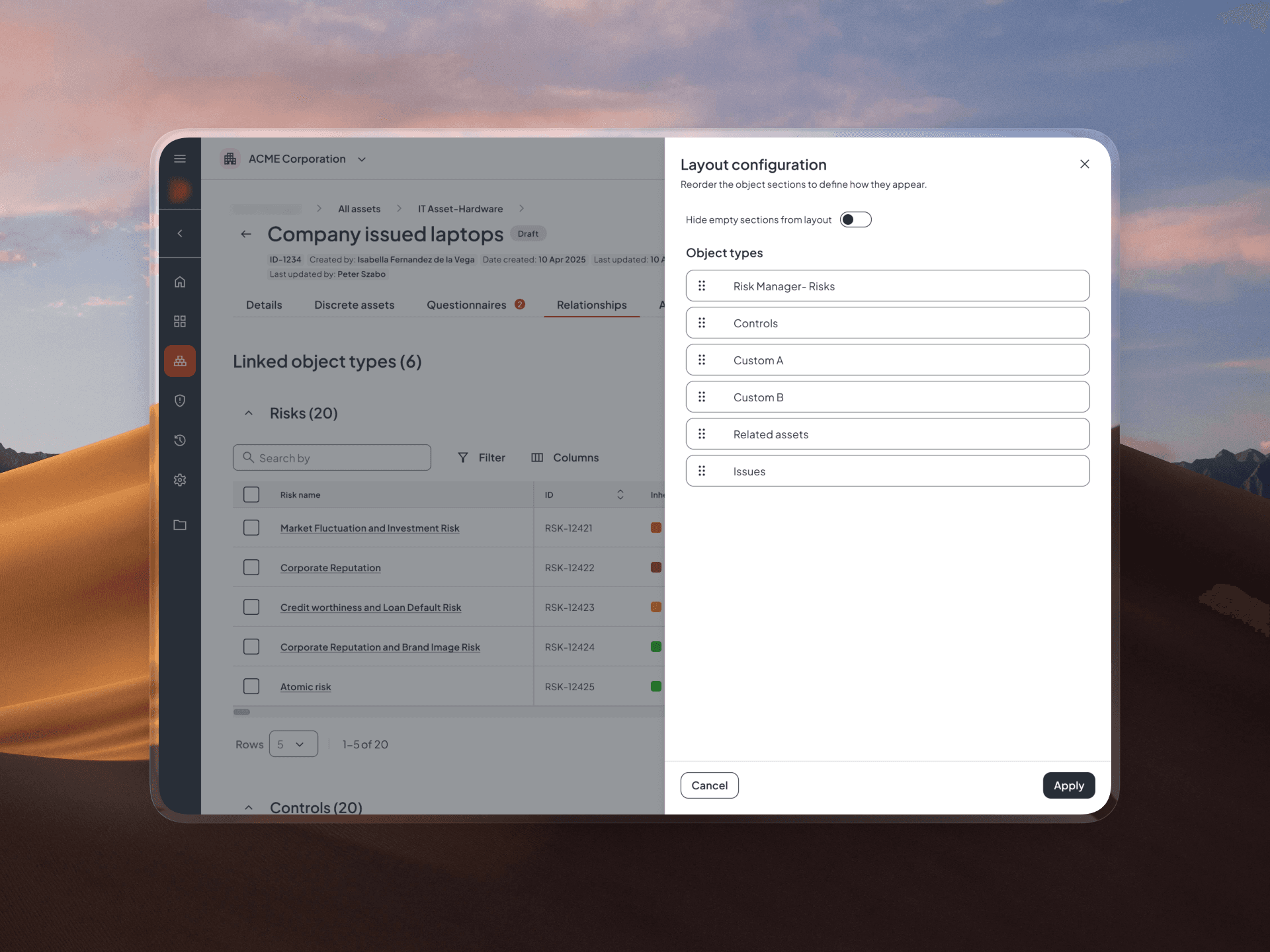
Reordering the layout
Why this direction:
The selected approach gave users more control and visibility when working with relationships. Compared to the previous experience, it removed several key limitations.
New structure- expandable tables
New linking method
A new way to see related objects
Reordering the layout
Why this direction:
The selected approach gave users more control and visibility when working with relationships. Compared to the previous experience, it removed several key limitations.
New structure- expandable tables
New linking method
A new way to see related objects
Reordering the layout
Decision points
More context during linking
Users are no longer limited to names and IDs — additional attributes help them identify the right entities with confidence.
Improved overview at scale
More information can be surfaced without overwhelming the layout, helping users maintain clarity even with larger datasets.
Faster navigation
An anchor navigation at the top helps users quickly jump between sections when multiple entity types are present.
Better visibility and filtering
The table layout allows more attributes to be displayed and filtered, making it easier to narrow down and compare results.
Flexible structure
Users can collapse sections and reorder them based on their priorities, adapting the experience to their workflow.
Decision points
More context during linking
Users are no longer limited to names and IDs — additional attributes help them identify the right entities with confidence.
Better visibility and filtering
The table layout allows more attributes to be displayed and filtered, making it easier to narrow down and compare results.
Improved overview at scale
More information can be surfaced without overwhelming the layout, helping users maintain clarity even with larger datasets.
Flexible structure
Users can collapse sections and reorder them based on their priorities, adapting the experience to their workflow.
Faster navigation
An anchor navigation at the top helps users quickly jump between sections when multiple entity types are present.
Decision points
More context during linking
Users are no longer limited to names and IDs — additional attributes help them identify the right entities with confidence.
Better visibility and filtering
The table layout allows more attributes to be displayed and filtered, making it easier to narrow down and compare results.
Improved overview at scale
More information can be surfaced without overwhelming the layout, helping users maintain clarity even with larger datasets.
Flexible structure
Users can collapse sections and reorder them based on their priorities, adapting the experience to their workflow.
Faster navigation
An anchor navigation at the top helps users quickly jump between sections when multiple entity types are present.
The impact
Measured improvements in usability and adoption, reported by users
The redesigned experience led to measurable improvements in how users interact with relationships. By reducing friction and improving visibility, the feature became a more active part of users’ workflows.
Increased feature adoption
Usage of the relationships view increased after the redesign, with more users returning to it as part of their regular workflow.
Higher interaction with data
Users engaged more with filtering, navigation, and attribute-based exploration — indicating that the experience better supports real tasks.
Faster and more confident linking
Providing additional context during linking reduced ambiguity and helped users complete actions with greater confidence.
Improved efficiency in large datasets
Users were able to navigate and understand complex relationship data with less effort, especially in high-volume scenarios.
The impact
Measured improvements in usability and adoption, reported by users
The redesigned experience led to measurable improvements in how users interact with relationships. By reducing friction and improving visibility, the feature became a more active part of users’ workflows.
Increased feature adoption
Usage of the relationships view increased after the redesign, with more users returning to it as part of their regular workflow.
Higher interaction with data
Users engaged more with filtering, navigation, and attribute-based exploration — indicating that the experience better supports real tasks.
Faster and more confident linking
Providing additional context during linking reduced ambiguity and helped users complete actions with greater confidence.
Improved efficiency in large datasets
Users were able to navigate and understand complex relationship data with less effort, especially in high-volume scenarios.
The impact
Measured improvements in usability and adoption, reported by users
The redesigned experience led to measurable improvements in how users interact with relationships. By reducing friction and improving visibility, the feature became a more active part of users’ workflows.
Increased feature adoption
Usage of the relationships view increased after the redesign, with more users returning to it as part of their regular workflow.
Higher interaction with data
Users engaged more with filtering, navigation, and attribute-based exploration — indicating that the experience better supports real tasks.
Faster and more confident linking
Providing additional context during linking reduced ambiguity and helped users complete actions with greater confidence.
Improved efficiency in large datasets
Users were able to navigate and understand complex relationship data with less effort, especially in high-volume scenarios.